VALORANT dot crosshair codes to copy
Copy working dot crosshair codes, preview pure center dots on real map scenes, then try micro-cross alternatives when a single point is too easy to lose.
White dot or tiny dot-style cross?
- White center dotThe listed Demon1 profile has a size-2 center dot, an outline and no inner or outer lines.
- Tiny white dot-style crossTap Dot Apex combines a size-1 dot with length-1, thickness-1 inner lines. It is not a pure one-pixel dot.
- Thicker white centerPixel combines a size-2 dot with thickness-4 inner lines. Try this when the finer center disappears.
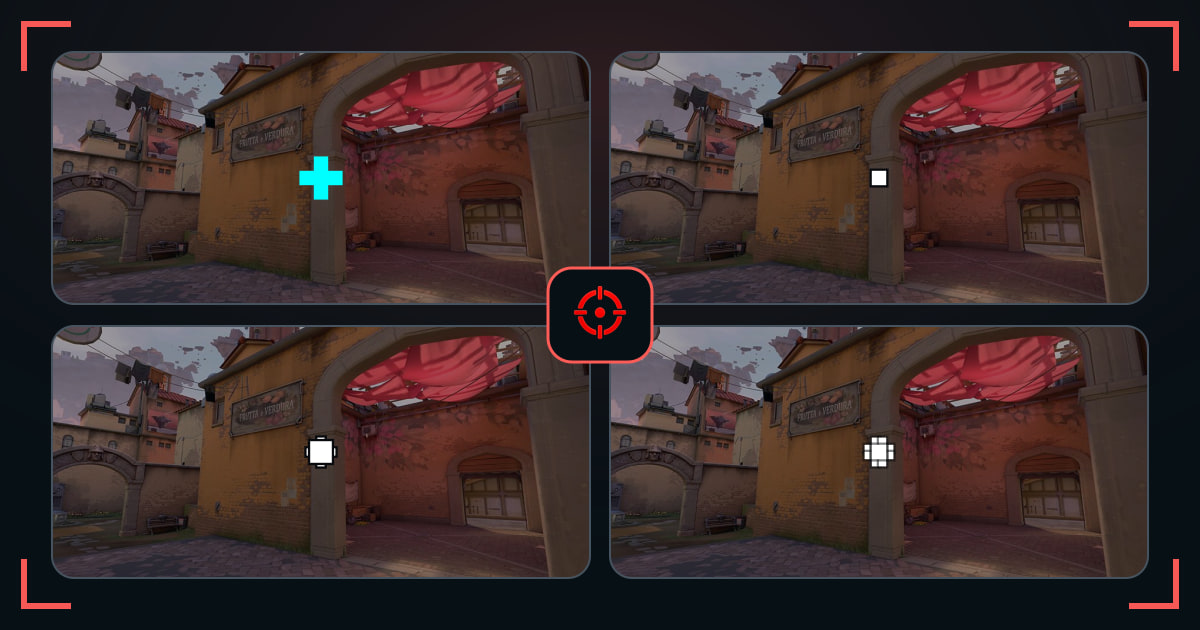
A pure dot crosshair uses one center mark with the inner and outer lines turned off. It keeps the target visible and gives first bullets and head-level placement one exact reference point.
The tradeoff is visibility: the smaller the dot, the easier it is to lose in utility or bright scenery. Start with the true dots in this collection; if they disappear, compare a thicker point or micro cross before changing your whole setup.
Choose the dot you can still find in a fight
- Start with a thicker dot or micro cross before trying a one-pixel point.
- Use the same map and color when comparing shapes.
- Look away from the center, snap back, and keep the dot you find first.
How to make a small dot crosshair
- For a pure dot, enable Center Dot and disable both Inner Lines and Outer Lines in your primary crosshair settings.
- Start with Center Dot Opacity 1 and Thickness 2. Compare Thickness 1 and 3 at your normal resolution; these are starting values, not a universal best setting.
- Try a thin outline on bright backgrounds. If the dot still disappears, compare a small cross rather than making the dot cover the target.
- To import a card above, copy its full code, open Settings → Crosshair → Import Profile Code, paste, and save a separate profile.
Common questions
Is a dot crosshair good in VALORANT?
It can be excellent for precise taps and disciplined placement. Players who spray often may prefer short lines around the center.
What is a VALORANT dot crosshair code?
It is a profile code that imports a center-dot or dot-style setup into VALORANT. Use the copy button on any card above, then paste the full code into Import Profile Code.
What dot size should I use?
Start small but clearly visible at your resolution. If you lose it during movement, use a thicker dot or add short inner lines.
Can a dot crosshair have an outline?
Yes. An outline improves contrast on bright backgrounds, although a heavy outline can make the dot look larger.
How do I make a white dot crosshair?
Choose white as the primary color, enable Center Dot and turn off inner and outer lines for a pure point. The white-dot profile linked above is a ready-made option; test its outline on both bright and dark map scenes.
Is a very small dot crosshair always one pixel?
No. A profile called a dot may also contain short inner lines. Check the code settings: Tap Dot Apex has a size-1 center dot plus lines, while the listed Demon1 profile disables both line layers.