Plus crosshair codes for VALORANT
Compare compact plus-shaped crosshairs with short, solid arms and a center that is quick to find in normal ranked fights.
Compare two compact plus settings
- Closed red plusCompact Cross Apex uses inner length 2, thickness 3 and offset 0. Center dot, outer lines and outline are off.
- White plus with a small gapCompact Cross Drift uses length 2, thickness 3 and offset 1, with an outline. Match color and outline before comparing the gap.
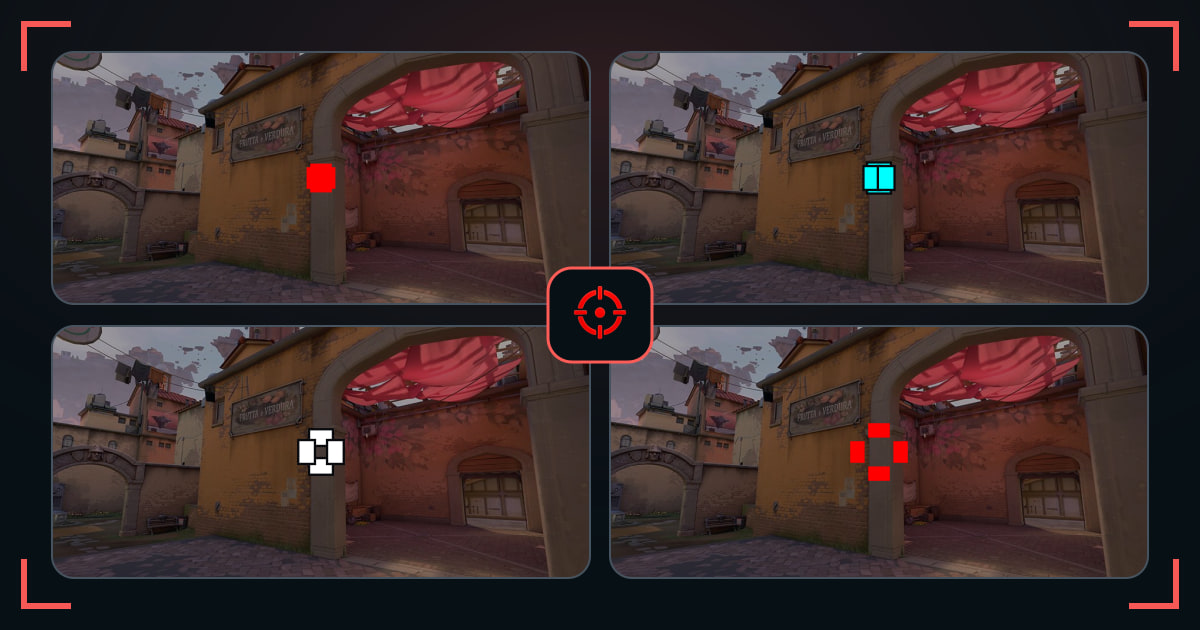
A plus crosshair is the familiar four-line shape with no decorative geometry. It gives clear horizontal and vertical references while keeping the setup easy to understand and tune.
Small changes to length, thickness, and gap make a bigger difference than they appear in the settings menu. Preview them on a distant target before choosing one.
How these crosshairs were selected
The collection uses compact four-line codes with distinct geometry. It includes open and nearly closed centers, several line weights, and both outlined and clean versions.
What to check before you copy
- For a simple +, enable Inner Lines and disable Center Dot and Outer Lines. Start with inner line opacity 1, length 4, thickness 2 and offset 0.
- Want a small opening instead of a solid center? Increase offset one step at a time. A closed plus and an open-center cross are different choices, not different accuracy settings.
- For a thinner plus, compare thickness 1 against 2 at your normal resolution. Keep movement and firing error off if you want the shape to stay static.
- Copy the profile you prefer above, then use Settings → Crosshair → Import Profile Code in VALORANT. Test it in the range before replacing your current profile.
Common questions
How do I make a plus crosshair in VALORANT?
Enable inner lines, keep all four arms the same length, and adjust offset for an open or closed center.
Is a plus crosshair good for beginners?
Yes. Its familiar shape is easy to read and simple to adjust without adding extra visual layers.
Can a plus crosshair have no gap?
Yes. Set inner-line offset to 0 for a closed center, as in Compact Cross Apex above. Increase offset for an opening; neither setting changes bullet accuracy.